Sunday, May 20, 2007

Flash Memory vs Autorun Virus/Trojan

It is better to know something about viruses that affect the flash memories. Because no one can say I am safe from virus even though you are using any, new, updated, and power full antivirus software. You may ask why? yes, it is because.. You might have installed and keep up to date anti-virus software within your laptop or PC. But sometimes you would need to use your Flash memories in other PC's as well. You can't avoid it. It is the one of main purpose of flash memory.

Flash memories are becoming as a main target for viruses and Trojans. I have Little experience fighting with a kind Of autorun virus virus that affects flash memories past days.

That main medium for that virus to spread is the flash memory. If you have a computer affected by that kinds of virus, the first job of that virus is to disable the folder option in windows Explorer/folder. It a main trick of it. Later I'LL come to that point. Then it resides in memory and searching for any new storage devices to be detected.

Normally you know if a Flash memory stick is plugged in to USB port, PC automatically detects it and open the root folder or ask you to select the action. When the virus detects these flash memory, It automatically copies the virus (one or more executable files) in to the flash memory. not only that, it also create an Autorun.inf file in the root of the flash memory and inside the fiLes it makes a Link to the virus's executabLe file. The second step of the virus's Job is now over.

Again you may use it in another PC as well. Yo may guess what wiLL happen if this Flash memory stick Will be plugged in to another PC that is not protected by any antivirus software. Here it starts the 3rd job. Then the flash memory is inserted, the autorun.inf file starts to work and run that executable virus file. Then this PC also falls in to the virus hell. And it is also now ready for spreading virus. This the Life cycLe of that virus.
And there is another big trick with some of these kinds of viruses. You may have important datas inside your flash memories which you frequently open. These kinds of virus use this point to attack your system. You Know how??

When the flash memory is plugged in to the affected PC, the virus hides all your document's folder with the attribute (S & h). then copies the copy of virus's executable file in the name of your file's folder and change its icon same as a foLder icon. any one open the flash memory Will double click those executable virus file thinking it as his file's folder. again it starts it Life cycLe. how tricky is it??


How to overcome from this virus

I am using NOD32 anti-virus software. After I installed this software, I found this is a best one for dealing with these autorun Trojans. below is an screen shot how NOD 32 detects the virus when flash memory plugged in.

If you wish to download NOD32 you can purchase or download a 30 days trial version from Original ESET's website here http://www.eset.com/download/index.php.

Bye!

Monday, May 14, 2007

Recovering DeLeted Datas from Pen Drive


Last time I discussed ablut getting the datas back from a Pendrive that has errlr. But in slme cases, we may accidentLy deLete datas from our pendrive. This is a most happening probLem with pendrives as because they are used in severaL PCs and pLaces. It may happen by our own.

Then what to do?? can say the boss "sory, I deLeted the datas"?? no. Then some how you have to get them back.

first of all it is better to know what happens to fiLes when they are deLeted.
ye! When you deLeted fiLes actuaLLy it is not removed from the computer. No even if you delete from RecycLy bin. In microsoft Windows O/Ss the filLe information is stored ni File Allocation TabLe (FAT/NTFS). If the fiLes is deLeted onLy the information on the FAT is removed and the free space is seen increased. The fiLe remain same. onLy when another new fiLe is copied to its physicaL Locatoin, the deLeted fiLes are Lost.

Then, hOw can we get them back??

There are many softwares that can work for us. I am usin DiskInternal's Dataeraser. I can say it is a good software to my concern. May be there more s/w better than this.

DiskInternal provide many tools to data recovery personels. I found it as a nice & easy to use tooLs for any one who is expert or even novice user. Here you can download & install the software. But the trial version is limited onLy for searching the deleted files. If you find you worth files are among these recoverable file then it would not be waste you to pay for it. Any way, the web is a Large store. you can go with it!!!
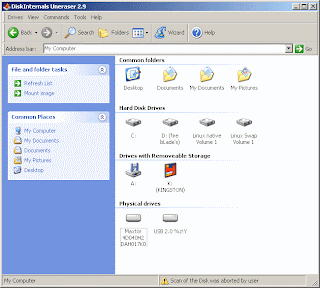
Don’t confuse. Above is not Windows folder. It is the simple user interface of DiskInternals Uneraser2.9. Working with it, is ease too.

If you need to recover deleted files on your pendrive, onLy thing you have to do is..

1. Plug in the Pendrive in PC
2. Start the Disk Internals Unerase.
3. DoubLe cLick the pendrive

Then a windows’s foLder-like window containing file in Pendrive will open. Among thoise files there is a foLder named “Recovered Files”(See below screen shot).

4. DoubLe click the Recovered files folder.


Then, the software automatically makes a deep search inside the Pendrive and displays aLL the files that can be UndeLeted/Recovered.
ProbabLy it will contain your deleted files!!!


The recovered files are grouped in each folder according to their file type. You can go through folder and select the files that want to be recovered

5. doubLe cLick on a file the which you want to recover

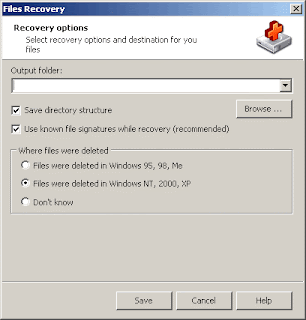
The foLLowing recovery dialogue box will appear.

6. Select a target path(The path where recovered files to be saved).
7. SeLect operating system where the file was deleted. If don’t know, select “Don’t Know”
8. Click save.

That’s aLL !!! Your file is recovered.

Yet, this software has more advanced features to recover more depth. The compLete instruction is provided in the manual.

DiskInternals provide More softwares to work with Datarecovery. SpeciaLLy I have to say another one. DiskInternals Flash Recovery. It is specially made for recovering photos from Digital Camera Memory chips. I quote below some more software for datarecovery. You can use any one that best compfort to you.

DiskInternals itself provide sOme toOoLs fOr data recOver

  • DiskInternals Uneraser
  • DiskInternals Flash Recovery
  • DiskInternals NTFS Recovery
  • DiskInternals CD/DVD Recovery
  • DiskInternals Partition Recovery
  • DiskInternals FAT Recovery
  • DiskInternals Outlook Express Repair
  • DiskInternals NTFS Reader (It is for Win9x os)
  • DiskInternals ZIP Repair (Easy and free fix for damaged zip files)
  • DiskInternals Linux Reader (A new free tool for extracting files from Ext2/Ext3 partitions in Windows)
  • DiskInternals Music Recovery

Some Other Softwares that can be used for data recovery

Wednesday, April 11, 2007

How to recover a Pen drive from Read Error


Here I would like to share my some of experience. Some days before I faced a problem with ma Pen drive. I copied 4 word documents which contained images and were little Larger in capacity. Say about 2 to 4 MB in capacity. Actually it is not my Pen Drive. I borrowed it from one of ma friend. It was 2 GB in capacity and Kingston in Brand.

All files ware copied smoothly. No errors were found. Everything was fine until I took it to the office. When I tried to get the documents back to ma office PC, then I came up with an error message. “Cannot read from source disk” at the middle of file copy process. Mmh! That is the problem. I stoped there. And think.. think.. think… Finally I got an idea. Lets see weather it worked for me or not.

First, I scanned the drive using Scan Disk. Here is how I did it.
Go to my Computer. Then right click the Pen Drive icon. In menu that appear select Properties.

Then the property dialogue box will appear. There select tools TAB and press Button.


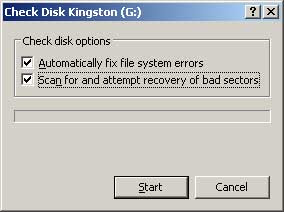
And in next dialogue select the two check boxes. And press start.


This will completely check the drive and attempts to recover any data that is located on a damaged (Bad sector) area of the Drive.

This is what I did. Yap! It was successful to me.

But in some occasions even this wont work. That is because of Disk Error. If there is a disk damage or bad sector this would happen. In those occasions we can get only the datas which are on non bad sector areas. If it happen, we must secure those areas without any files would be copied again to those areas for our future safety.

I stop here today. It is getting dark in my Friday evening. I’ll discuss how to recover the bad sectored or damaged Pen Drive on next weak or before when I have fresh time.